
Sound Wave Generator Online: Create and Visualize Audio Waves Instantly
By ZonoTools9 min read

Introduction
Sound is everywhere — in music, communication, science, and technology. A sound wave generator online does not only play audio; it helps you see oscillations in real time so you understand how the wave changes when you adjust frequency or waveform.
Unlike bulky installed software, a browser-based tool lets you experiment immediately — useful for developers, students, and creators.
Many people pair it with the Sound Generator to broaden the palette, or with the White Noise Generator when they need a gentle background for focus or relaxation.
What is a sound wave generator online?
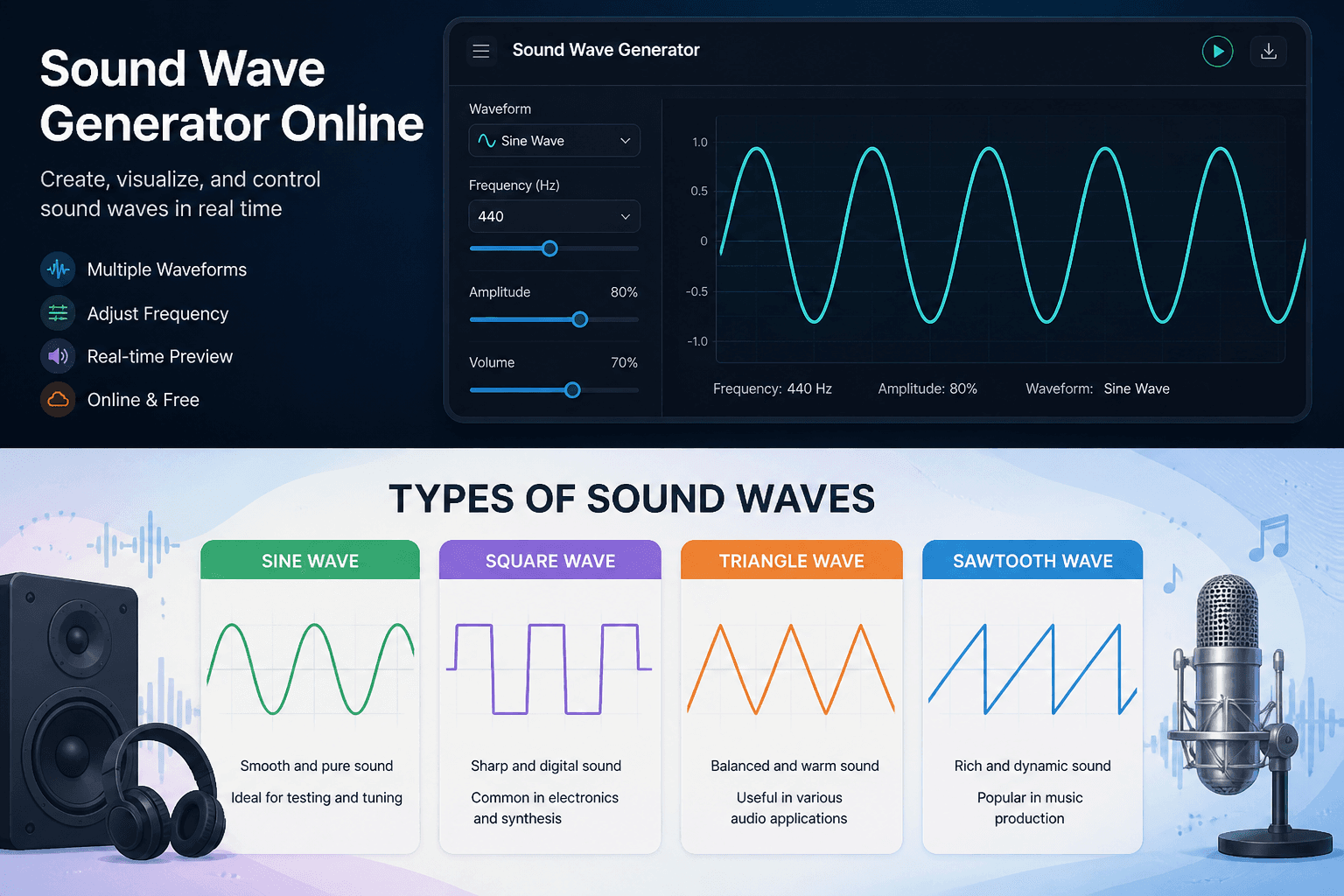
It is a tool that synthesizes audio signals as waveforms and typically lets you:
- Pick wave types: sine, square, triangle, sawtooth
- Control frequency (pitch)
- Visualize wave behavior
- Experiment in real time
The difference from a simple music player is the focus on the relationship between technical parameters and wave shape — ideal for learning and testing.
How sound waves work
Sound waves are vibrations traveling through a medium (usually air). Three core ideas:
- Frequency (Hz): sets pitch — high or low.
- Amplitude: ties closely to perceived loudness (along with your system level).
- Waveform: shapes timbre — the “color” of the sound and its harmonic content.
A good sound wave generator lets you tune all three and observe the result on screen and through speakers or headphones.
Visualizing sound waves
Visualization turns audio from something you only hear into something you can see and reason about.
What you can observe
- Smooth sine traces for near-pure tones
- Square waves with sharp transitions, evoking digital signals
- Richer patterns on sawtooth or when multiple components combine
For learning or demos, seeing the wave move in sync with the audio reinforces intuition about period and amplitude.
Types of sound waves you can generate
Sine wave
Smooth sound with few strong harmonics; great for testing and tuning.
Square wave
Bright, “digital” character; common in electronics and synthesis.
Triangle wave
A middle ground between the edge of a square and the purity of a sine.
Sawtooth wave
Harmonically rich, widely used in electronic music.
To build long-form layered scenes (rain, ocean, noise), consider the Sound Generator once you are comfortable with basic waveforms.
Why use a sound wave generator online?
- No installation required
- Instant sound creation
- Real-time waveform display (when the tool supports it)
- Intuitive frequency control
- Runs on modern browsers across devices
That flexibility suits both quick checks and short lab sessions.
Common use cases
Audio testing
Engineers and developers use fixed tones or waves to probe speakers, headphones, and playback pipelines.
Education
Students see the link between Hz ↔ pitch and waveform ↔ timbre.
Music and sound design
Creators try amplitude, frequency, and wave shape before moving ideas into a DAW.
Relaxation and focus
Wave generators are technical; when you need a softer bed for work or sleep, the White Noise Generator is often the more natural choice.
How to use a sound wave generator online
1. Select a waveform
2. Set frequency (Hz)
3. Set volume / amplitude to a safe level
4. Press Play
5. Watch the waveform plot update in real time
When you need a richer sonic environment, move to the Sound Generator to blend multiple sources and presets.
Create your own sound
Instead of relying only on pre-made files, you can:
- Design custom tones
- Explore different frequency ranges
- Build repeatable listening demos
- Learn how parameter changes reshape the wave
That level of control helps learners, musicians, and engineers alike.
Sound wave generator vs Sound Generator
- Sound wave generator online: emphasizes wave creation + visualization (seeing the oscillation).
- Sound generator: emphasizes a broad sound library (noise, nature, behavior presets) for everyday listening use cases.
Together they form a toolkit that is part lab and part listening room.
Advanced features to look for
- Real-time waveform display
- Frequency sweeps (when available)
- Layering multiple oscillators or waves
- Fine amplitude control
- Small Hz steps for systematic sweeps
Best practices
- Start with a simple sine
- Increase frequency gradually instead of large jumps while wearing headphones
- Use good headphones when accuracy matters
- Avoid sustained loud levels, especially in the treble range
After intense testing sessions, switching to the White Noise Generator can give your ears a break with a more even bed.
When should you use a sound wave generator?
- Testing playback or capture gear
- Learning about waves and frequency
- Building custom tones for demos
- Quick in-browser audio experiments
When scope grows into ambient mixing, use the Sound Generator.
FAQ
What is a sound wave generator online?
A web tool that creates audio signals and often shows the waveform in real time.
Can I use it for free?
Most tools in this category offer free access to core features in the browser.
What types of waves can I generate?
Typically sine, square, triangle, and sawtooth.
Is it good for beginners?
Yes — especially when a graph accompanies playback for visual learning.
Conclusion
A sound wave generator online bridges vibration theory and a listen-and-see experience in the browser. Whether you are testing hardware, teaching, or designing sound, hearing and seeing the wave leads to faster, better-grounded decisions.
Round out your ZonoTools audio workflow with the Sound Generator for multi-layer scenes and the White Noise Generator when you want a stable, long-listening-friendly background.